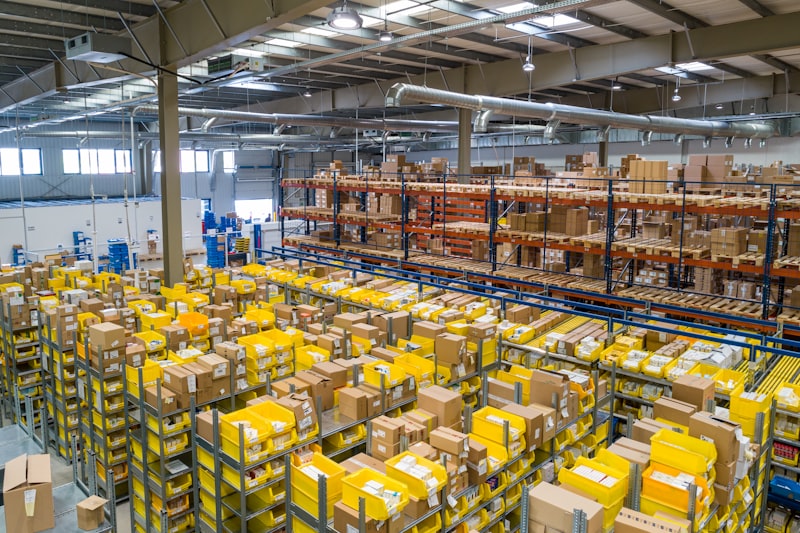
Complete Tutorial: Setting Up Multi-Warehouse Inventory with an Efficient Barcode System
Learn how to implement a barcode-based multi-warehouse inventory system for optimal data accuracy and operational efficiency. This article covers concepts, technical architecture, code examples, error handling, and best practices for better stock management.
Inventory management in multi-warehouse environments often becomes a scourge for many organizations, from hospitals with their pharmacy and logistics warehouses, to clinics and retail with various points of item storage. Inaccurate stock data, time-consuming item search processes, human error in recording, and the inability to see stock visibility in real-time are classic problems that can hamper operations and result in financial losses. Imagine a hospital running out of vital drug stock because the data in the system is not synchronized with the physical stock in the pharmacy warehouse, or a clinic having difficulty tracking the batch number of expired lab reagents due to manual processes. These challenges become increasingly complex as the number of warehouses and item volume grow. To overcome this problem, adopting a multi-warehouse inventory system integrated with barcode technology becomes a necessity. This article will guide you in depth, from basic concepts to technical implementation, complete with runnable code examples, error handling, and best practices to ensure your system runs optimally.
Basic Concepts & Benefits of Barcode Multi-Warehouse Inventory Systems
A multi-warehouse inventory system with barcode is an integrated solution that enables organizations to track and manage item stock across various storage locations (warehouses, depots, pharmacies, etc.) accurately and efficiently using unique barcode-based identification. Its main concept is that each item or storage location is given a unique barcode, which is then scanned using a special device to record every item movement (inbound, outbound, transfer, return). This eliminates the need for manual recording that is prone to errors and speeds up transaction processes.
The benefits of implementing this system are very significant. First, a drastic increase in stock accuracy, often reaching 99% or more, compared with manual systems that may only reach 70-80%. This means reducing losses due to dead, expired, or lost stock. Second, operational efficiency increases by up to 50% or more, especially in the receiving, picking, and stock-taking processes. Staff can process transactions faster and reduce item search time. Third, real-time stock visibility allows operational managers and decision-makers to see stock positions in all warehouses anytime, anywhere. This is crucial for procurement planning, distribution, and preventing stock shortages or excesses.
As a concrete example, a pharmacy chain with 10 branches and one central warehouse can use this system to track drug stock at each location. When drugs are received at the central warehouse, the barcode is scanned. When they are distributed to branches, the barcode is scanned again, and the stock data in the system will be automatically updated at the central warehouse and the destination branch. If any drug is approaching its expiration date, the system can provide an early warning so preventive action can be taken. In the context of hospitals, this system ensures the availability of critical medical and pharmaceutical supplies, and facilitates batch number tracking for audit or product recall purposes if needed, in accordance with the standards of PMK No. 72 Year 2016 concerning Pharmaceutical Service Standards in Hospitals.
The main components of this system include hardware such as barcode scanners (for example, Zebra DS2278 or Honeywell Voyager 1202g) and barcode printers (Zebra ZD421), as well as inventory management software that can be a module within a larger ERP system (such as the ERP Poultry/Layer I once developed) or a dedicated warehouse management system (WMS). The database is the backbone for storing all stock, location, and transaction data. The interconnection among these components is the key to the system's success.
Architecture & Technical Implementation of the Inventory System
Implementing a multi-warehouse inventory system with barcode requires a robust and scalable architecture. Generally, the architecture used is client-server with an API-driven approach. This means there is a frontend application (whether web- or mobile-based) used by warehouse staff to perform barcode scanning and other interactions, and a backend application (API) responsible for processing business logic and interacting with the database. This approach ensures decoupling between presentation and business logic, facilitating development, maintenance, and scalability.
For the backend side, the technology we recommend is Laravel 11.x with PHP version 8.2+. Laravel provides a solid framework for building secure and efficient RESTful APIs. For more complex projects or those requiring microservices, Lumen 10.x can be a lighter alternative. Our database of choice is PostgreSQL 16. PostgreSQL excels in handling complex relational data and has advanced features such as the JSONB data type, which is very useful for storing flexible product metadata or additional configuration, as well as strong indexing for fast query performance, especially in tables with high transaction volumes.
On the frontend side, for web applications, Vue.js 3 or React 18 is an excellent choice because of its ability to build responsive and interactive user interfaces. For mobile applications used on scanner devices or smartphones, React Native is the ideal choice because it enables cross-platform application development (iOS and Android) from a single codebase, accelerating development time and reducing costs. This mobile application will communicate with the backend API to send barcode scan result data in real-time.
Integration with other systems is a crucial aspect. In the hospital context, this inventory system must be able to integrate with the existing SIMRS. We often perform bridging of stock data to SIMRS using the FHIR R4 (Fast Healthcare Interoperability Resources Release 4) standard via API. Libraries such as HAPI FHIR 6.8 can be used on the backend to facilitate the creation and parsing of FHIR messages. For general ERP systems, integration can be done through standard RESTful APIs. Make sure the API is well-designed, secure (using OAuth2 or JWT for authentication), and clearly documented (for example using OpenAPI/Swagger).
The key data structure in the PostgreSQL database will include the products table (for item details, barcode), warehouses (for warehouse details), inventory_items (to store stock per product in each warehouse, including batch number and expiry date), and transactions (to record every stock movement as an audit trail). The use of indexes on key columns such as product_id, warehouse_id, barcode, and expiry_date is very important to ensure system performance remains optimal as data grows.
Code Example: API & Stock Management Logic
This section will present an example code implementation for an API endpoint responsible for receiving barcode scan data and updating stock. We will use Laravel 11.x for the backend, assuming the Product, Warehouse, and InventoryItem models are already defined.
First, we define an API route to handle barcode scanning requests. This route will direct requests to the handleScan method in InventoryController.
// routes/api.php
use App\Http\Controllers\InventoryController;
use Illuminate\Support\Facades\Route;

Route::post('/inventory/scan', [InventoryController::class, 'handleScan']);
Next, we will create InventoryController containing the logic to validate incoming data, find products, and update stock in the inventory_items table. This logic includes adding stock ('in'), reducing stock ('out'), and transfers between warehouses ('transfer_in', 'transfer_out'). It is important to use database transactions (DB::beginTransaction() and DB::commit()) to ensure data integrity, especially in stock operations involving multiple steps.
// app/Http/Controllers/InventoryController.php
namespace App\Http\Controllers;

use Illuminate\Http\Request;
use App\Models\InventoryItem;
use App\Models\Product;
use App\Models\Warehouse;
use Illuminate\Support\Facades\DB;
use Illuminate\Validation\ValidationException;

class InventoryController extends Controller
{
    public function handleScan(Request $request)
    {
        try {
            $validated = $request->validate([
                'barcode' => 'required|string|max:255',
                'warehouse_id' => 'required|exists:warehouses,id',
                'quantity' => 'required|integer|min:1',
                'transaction_type' => 'required|in:in,out,transfer_in,transfer_out', // 'in' for stock addition, 'out' for stock deduction
                'batch_number' => 'nullable|string|max:255',
                'expiry_date' => 'nullable|date',
                'target_warehouse_id' => 'required_if:transaction_type,transfer_out|exists:warehouses,id|different:warehouse_id',
            ]);

            $product = Product::where('barcode', $validated['barcode'])->first();
            if (!$product) {
                return response()->json(['message' => 'Produk tidak ditemukan.'], 404);
            }

            DB::beginTransaction();

            if (in_array($validated['transaction_type'], ['in', 'transfer_in'])) {
                $item = InventoryItem::firstOrCreate(
                    [
                        'product_id' => $product->id,
                        'warehouse_id' => $validated['warehouse_id'],
                        'batch_number' => $validated['batch_number'] ?? null,
                        'expiry_date' => $validated['expiry_date'] ?? null,
                    ],
                    ['quantity' => 0]
                );
                $item->quantity += $validated['quantity'];
                $item->save();
                // Log transaction (e.g., to InventoryTransaction model)
            } elseif (in_array($validated['transaction_type'], ['out', 'transfer_out'])) {
                $item = InventoryItem::where('product_id', $product->id)
                                    ->where('warehouse_id', $validated['warehouse_id'])
                                    ->where('batch_number', $validated['batch_number'] ?? null)
                                    ->where('expiry_date', $validated['expiry_date'] ?? null)
                                    ->first();

                if (!$item || $item->quantity < $validated['quantity']) {
                    DB::rollBack();
                    return response()->json(['message' => 'Stok tidak mencukupi atau item tidak ditemukan.'], 400);
                }
                $item->quantity -= $validated['quantity'];
                $item->save();
                // Log transaction

                if ($validated['transaction_type'] == 'transfer_out') {
                    // Logic for transfer_in to target_warehouse_id
                    $targetItem = InventoryItem::firstOrCreate(
                        [
                            'product_id' => $product->id,
                            'warehouse_id' => $validated['target_warehouse_id'],
                            'batch_number' => $validated['batch_number'] ?? null,
                            'expiry_date' => $validated['expiry_date'] ?? null,
                        ],
                        ['quantity' => 0]
                    );
                    $targetItem->quantity += $validated['quantity'];
                    $targetItem->save();
                    // Log transfer transaction
                }
            }

            DB::commit();
            return response()->json(['message' => 'Stok berhasil diperbarui.', 'current_stock' => $item->quantity], 200);

        } catch (ValidationException $e) {
            DB::rollBack();
            return response()->json(['message' => 'Validasi gagal.', 'errors' => $e->errors()], 422);
        } catch (\Exception $e) {
            DB::rollBack();
            return response()->json(['message' => 'Terjadi kesalahan server.', 'error' => $e->getMessage()], 500);
        }
    }
}
The code above shows how validation is performed, products are searched by barcode, and stock is updated or transferred. The use of firstOrCreate is very helpful for adding a new stock entry if one does not yet exist for a specific combination of product, warehouse, batch, and expiration date. Error handling is also included for validation and stock checking.
The following is an example database migration for the relevant warehouses, products, and inventory_items tables. Note the use of indexes and unique constraints for performance and data integrity, especially on PostgreSQL 16.
// database/migrations/xxxx_xx_xx_xxxxxx_create_inventory_tables.php

use Illuminate\Database\Migrations\Migration;
use Illuminate\Database\Schema\Blueprint;
use Illuminate\Support\Facades\Schema;

return new class extends Migration
{
    /**
     * Run the migrations.
     */
    public function up(): void
    {
        Schema::create('warehouses', function (Blueprint $table) {
            $table->id();
            $table->string('name')->unique();
            $table->string('location')->nullable();
            $table->timestamps();
        });

        Schema::create('products', function (Blueprint $table) {
            $table->id();
            $table->string('name');
            $table->string('barcode')->unique();
            $table->text('description')->nullable();
            $table->string('unit')->default('pcs'); // e.g., pcs, box, strip
            $table->decimal('price', 15, 2)->default(0);
            $table->timestamps();
        });

        Schema::create('inventory_items', function (Blueprint $table) {
            $table->id();
            $table->foreignId('product_id')->constrained('products')->onDelete('cascade');
            $table->foreignId('warehouse_id')->constrained('warehouses')->onDelete('cascade');
            $table->integer('quantity')->default(0);
            $table->string('batch_number')->nullable();
            $table->date('expiry_date')->nullable();
            $table->timestamps();

            // Unique constraint for product, warehouse, batch, expiry to prevent duplicate entries
            $table->unique(['product_id', 'warehouse_id', 'batch_number', 'expiry_date'], 'inventory_unique_item_per_warehouse');

            // Indexes for faster lookups
            $table->index('product_id');
            $table->index('warehouse_id');
            $table->index('batch_number');
            $table->index('expiry_date');
        });

        // Optional: Transaction Log table for auditing
        Schema::create('inventory_transactions', function (Blueprint $table) {
            $table->id();
            $table->foreignId('inventory_item_id')->constrained('inventory_items')->onDelete('cascade');
            $table->string('transaction_type'); // e.g., 'in', 'out', 'transfer_in', 'transfer_out'
            $table->integer('quantity_change'); // positive for 'in', negative for 'out'
            $table->integer('current_stock_after_transaction');
            $table->foreignId('user_id')->nullable()->constrained('users')->onDelete('set null'); // User who performed the transaction
            $table->text('notes')->nullable();
            $table->timestamp('transaction_date')->useCurrent();
            $table->timestamps();

            $table->index('transaction_type');
            $table->index('transaction_date');
        });
    }

    /**
     * Reverse the migrations.
     */
    public function down(): void
    {
        Schema::dropIfExists('inventory_transactions');
        Schema::dropIfExists('inventory_items');
        Schema::dropIfExists('products');
        Schema::dropIfExists('warehouses');
    }
};
This migration creates the basic tables required for a multi-warehouse inventory system, including a table for transaction logs, which is very important for auditing and tracing stock history. The batch_number and expiry_date columns are vital for precise stock management, especially in the pharmaceutical and food industries.
Error Handling & Integration Payload Example
Robust error handling is key to ensuring the barcode inventory system works reliably and provides a good user experience. Every interaction with the API, especially those involving stock data updates, must anticipate various error scenarios, from input validation issues to server failures.
The following is an example JSON payload sent to the /api/inventory/scan endpoint for a stock addition scenario:
{
  "barcode": "PRD-12345-BATCH-A",
  "warehouse_id": 2,
  "transaction_type": "in",
  "quantity": 50,
  "batch_number": "BATCH-A",
  "expiry_date": "2026-12-31",
  "notes": "Penerimaan barang dari supplier PT ABC"
}
A successful response will return a 200 OK status with the details of the newly created transaction. However, if a validation error occurs, for example, warehouse_id is not found, the API must return a 422 Unprocessable Entity status along with a clear error message, such as { "error": "Warehouse not found" }. For server failures, use the 500 Internal Server Error status and ensure the log is recorded properly. Also apply an idempotency key mechanism to every scan request to prevent duplicate transactions due to network retries.
Practical Implementation Tips in the Field
First, ensure that the barcode format used is consistent throughout the warehouse. Use standards such as Code 128 or QR Code that can accommodate product, batch, and expiration date information in a single symbol. Avoid using 1D barcodes that only contain the product ID, as this will make batch tracking more difficult. Conduct scanning trials under various lighting conditions and distances to ensure the scanner can read quickly, especially if operators are wearing gloves or working in extreme environments.
Second, implement the right data synchronization strategy. If using mobile scanner devices connected to the internet, ensure there is an offline-first mechanism that stores transactions locally when the connection is lost, then sends them back to the server when online. For fully online systems, use webhooks or polling to update stock in real time across all warehouses. Don't forget to perform regular stock reconciliation, for example at the end of each month, to detect discrepancies caused by scanning errors or missing items.
Third, train operators with clear standard operating procedures (SOPs). Create a short illustrated guide on how to scan, select the source/destination warehouse, and confirm transactions. Also provide an undo or transaction correction feature within a certain time frame to anticipate input errors. Monitor metrics such as processing time per scan and error rate to continuously improve efficiency. With discipline and the right tools, a barcode-based multi-warehouse inventory system will provide stock accuracy of up to 99%.
FAQ
Can this system be used for warehouses spread across multiple cities?
Yes, this system is designed for multi-warehouse. You can add as many warehouse records as needed, and each transaction will be recorded based on warehouse_id. Ensure each warehouse has a stable internet connection or offline mode support for data synchronization.
How do you handle products that have many batches and different expiration dates?
Use the batch_number and expiry_date columns in the inventory_items table. When scanning, the operator can select the appropriate batch or the system can automatically select the batch with the nearest expiration date (FEFO). Ensure stock reports display details per batch to make management easier.
Is there a limit on the number of scans per second?
The limit depends on the server infrastructure and the type of scanner. For web applications, usually 10-20 scans per second is still safe. If volume is high, consider using a queue such as Redis or RabbitMQ to process transactions asynchronously.
What if duplicate scans occur due to operator error?
Apply idempotency key validation on every request. In addition, provide a minimum delay of 2 seconds between scans for the same product, or use double confirmation for large-quantity transactions. A transaction cancellation feature is also important for correcting errors.
Conclusion
Building an efficient multi-warehouse inventory system with a barcode system requires careful planning, from database design, API, to error handling and user training. By following this tutorial, you already have a strong foundation for implementing an accurate, fast, and scalable solution. Don't hesitate to continue developing features such as ERP integration, predictive analytics, or IoT-based real-time tracking.
If you need further assistance in designing or implementing an inventory system that suits your business needs, our expert team is ready to help. Consult your needs now and get the right, efficient, and budget-friendly solution. Contact us by email at info@example.com or visit our contact page to schedule a free consultation session.
This article is part of the education by Nugroho Setiawan, an IT consultant in Jogja. Related solutions: SIMRS SIM Klinik Integrator Bridging SatuSehat. Need free consultation?
Komentar
Belum ada komentar. Jadilah yang pertama!
Saya membantu konsultasi IT & pengembangan aplikasi untuk rumah sakit, klinik, dan bisnis di Yogyakarta (DIY), Magelang, dan sekitarnya.
Artikel Terkait
Baca juga artikel lainnya