Multi-Warehouse Inventory Setup Tutorial with Barcode System: Technical Guide and Best Practices
A technical guide to building a barcode-based multi-warehouse inventory: ledger schema, Code128 label printing, scan validation, and stock accuracy KPIs.
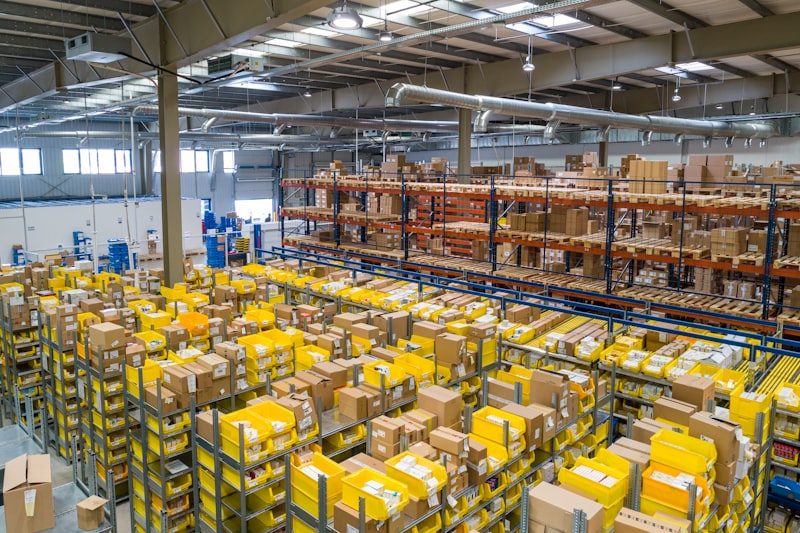
Many businesses in Yogyakarta and Magelang only realize inventory problems after opening a second warehouse. A spreadsheet that was once adequate suddenly falls apart: the system says stock is 240 pcs, physical stock on the shelf is 186 pcs, and 40 inter-location transfer transactions are recorded in a WhatsApp group. At a pharmaceutical distribution client with 4,800 SKUs, 2 warehouses, and 26 bins, stock discrepancies reached 7–12% before the barcode system was implemented, while manual stock opname took 3 working days per month. After bin locations and barcodes were implemented, discrepancies fell to 0.4% and opname finished in 6 hours. This article dissects the technical steps for building barcode-based multi-warehouse inventory — data structure, label printing, daily scanning flow — that can be replicated with Laravel 11, PostgreSQL 16, and a thermal label printer.
Data Foundation: Store Movements, Not Just Stock
The first mistake that almost always appears is storing a single stok column in the product table. Once there are two warehouses, that column no longer has meaning. Use three location levels: warehouse → zone → bin. Barcodes are not only for products; barcodes for bin are actually more crucial. A format that is easy for humans and machines to read: WH01-A-03-02 (warehouse 01, zone A, shelf 03, level 02). Each bin has a type: receiving, picking, or quarantine, so scanning goods into a quarantine bin automatically blocks sales.
Second, make stock movements the source of truth. The stock_movements table is append-only: there is no UPDATE, no DELETE, and corrections are made with reversing rows. Balances are calculated via a view or materialized view that is refreshed every 5 minutes. At a volume of 200 transactions/day (about 1.2 million rows per year), the balance query per SKU remains under 50 ms in PostgreSQL 16 as long as there is a composite index (sku, warehouse_id, scanned_at).
CREATE TABLE stock_movements (
  id BIGSERIAL PRIMARY KEY,
  sku VARCHAR(32) NOT NULL,
  warehouse_id INT NOT NULL,
  bin_code VARCHAR(16) NOT NULL,
  qty NUMERIC(12,2) NOT NULL,        -- + masuk, - keluar
  ref_doc VARCHAR(40) NOT NULL,
  scanned_at TIMESTAMPTZ DEFAULT now()
);
CREATE INDEX idx_mv_sku_wh ON stock_movements (sku, warehouse_id);
SELECT sku, warehouse_id, SUM(qty) AS on_hand
FROM stock_movements GROUP BY sku, warehouse_id;
Third, prepare the things that are often forgotten: unit conversion (1 box = 24 pcs), batch/lot, and expiry dates. For pharmaceutical and clinic clients, a stock_lots table with FEFO (first expired first out) must exist before integration with SIMRS or SIM Klinik, because stock reductions must specify which lot is going out. Finally, add a separate reservation table for soft allocation so that stock already ordered by sales orders is not counted as available.
Building a Barcode System: Symbology, Labels, and Scanners
Choose a symbology according to your needs. Code128 is suitable for internal SKUs because it is dense and flexible; GS1-128 is used if you need to embed lot and expiry in a single symbol; QR is better for bins because it can contain small JSON (bin code, type, capacity). Avoid EAN-13 for internal codes — it is prone to conflicts with manufacturer barcodes. Set scanner prefixes so the application knows the scan type: #B for bin, #S for SKU, #D for documents.
For label printing, picqer/php-barcode-generator ^3.1 in Laravel 11 is sufficient to generate PNG/SVG Code128, then render to PDF with DomPDF and send to a Zebra ZD230 printer (203 dpi). Label settings of 50×25 mm, 2 mm gap, and 4 ips speed produce about 2,400 labels/hour — enough for 4,800 SKUs in two shifts. Save the generated results to disk and cache so they are not regenerated every time you reprint.
On the scanning side, the Zebra DS2208 with USB-HID mode (keyboard wedge) is the most practical: no driver is needed, and scan results go directly into the input field. If the warehouse wants to use an Android phone, use ML Kit Barcode Scanning 17.x in a Flutter 3.24 application — decode latency is around 40–80 ms on a 1080p camera, enough for one-handed scanning while holding a box.
What makes accuracy jump to 99.8% is not hardware but validation. Every scan must be checked: is this SKU actually scheduled to enter that bin? If not, reject it and ask for a rescan. A scanner that is always right is actually dangerous because errors get stored neatly along with everything else.
Daily Operational Flow and Numbers to Monitor
For goods receipt, apply the three-scan rule: scan PO, scan bin, scan SKU. Without all three, a document cannot be closed. At a client with 1,200 receipts per month, this rule cuts input time from 9 minutes to 2.5 minutes per document and eliminates cases where goods arrive but are not recorded.
Inter-warehouse transfers must be two steps: leave the origin warehouse (in-transit status) and then enter the destination warehouse. A single direct step will make stock hang while the truck is still on the road. The Yogyakarta–Magelang route itself is only about 3 hours, but the transfer SLA should be set to 1×24 hours so there is a buffer for documents not yet scanned on the receiving side.
Use ABC cycle counting, not a full stock opname every month. Class A SKUs (30% of SKUs, 70% of value) are counted 4× a year, class B 2×, class C 1×. A simple reorder point formula: (average daily usage × lead time) + safety stock. Example: 45 pcs/day × 4 days + 120 = 300 pcs, meaning a PO is created when the available balance reaches 300.
Monitor four KPIs: inventory accuracy ≥ 99.5%, fill rate ≥ 96%, dead stock value (more than 90 days without movement) below 5% of total inventory value, and stock opname discrepancy per bin. These numbers should appear on the dashboard, not just total stock.
Best Practices
- Barcode the bin first, then the product barcode. Without a location address, the system only knows there are 200 pcs, not where they are located.
- Implement an append-only ledger. Corrections always go through reversing entries so the audit trail can be accounted for during stock audit.
- Validate every scan against the document context. Reject scans that do not match the schedule, even if the barcode reads perfectly.
- Separate available, reserved, and in-transit stock. One number for three different conditions is a source of allocation errors.
- Test with 50 SKUs and one bin for two weeks before full rollout. Fix the SOP at small scale; migrating 4,800 SKUs at once almost always ends in an emergency stock opname.
FAQ
Is a thermal label printer mandatory?
Not mandatory, but highly recommended. A laser printer with A4 stickers can be used for trials, but the cost per label is 3–5× more expensive and the cut results are inconsistent. Zebra ZD230 or TSC TE200 are common choices on a budget of 3–4 million rupiah.
How to handle goods without barcode from suppliers?
Print internal labels on receipt (print-on-receive) with internal SKU, then store the mapping to the supplier code in the supplier_items table. Do not stick a new label over the factory barcode if the goods can still be returned to the supplier.
Can this system connect to an existing SIMRS or ERP?
Yes. The safest pattern is to synchronize master items and transactions via API or message queue, while the warehouse ledger remains the source of truth for physical quantities. For BPJS/SatuSehat/FHIR integration, item code mapping is usually more complicated than the stock issue itself.
How long is the implementation for two warehouses?
With a scope of 4,800 SKUs and two warehouses, 4–6 weeks is enough: 1 week of data design, 1 week of label printing and scanner testing, 2 weeks of parallel testing, the rest for training and phased go-live per zone.
Multi-warehouse inventory is not about buying expensive scanners, but about discipline in data structure and workflow. Start with movement ledger, bin barcode, and scan validation; these three contribute most of the accuracy improvement. If your team is preparing a second warehouse in DIY or Magelang and needs technical assistance, our IT consulting and application development services (SIMRS, SIM Klinik, ERP, POS, website) cover schema design, scanning application development, and integration into existing systems. Discuss your needs — a short 60-minute audit is usually enough to map priorities and cost estimates.
This article is part of the knowledge base of Nugroho Setiawan, an IT consultant in Jogja (Yogyakarta). Related solutions: SIMRS (Hospital Information System) Clinic Management System SatuSehat Integration. Need a free consultation?
Komentar
Belum ada komentar. Jadilah yang pertama!
Saya membantu konsultasi IT & pengembangan aplikasi untuk rumah sakit, klinik, dan bisnis di Yogyakarta (DIY), Magelang, dan sekitarnya.
Artikel Terkait
Baca juga artikel lainnya