Learn how to implement an ERP system to monitor daily egg production in real time, improve operational efficiency, and make data-driven strategic decisions. This article guides you through the concepts, technical implementation, and best practices.
Daily egg production management on farms is often faced with significant challenges. Manual recording, which is still commonly done, is prone to human error, time-consuming, and makes it difficult to analyze historical data to identify trends or anomalies. Without accurate and real-time data, strategic decision-making—from adjusting feed formulations, early detection of flock health issues, to planning sales capacity—becomes reactive and less than optimal. For example, a 5% decrease in production in 10,000 laying hens could mean a loss of tens of millions of rupiah in a week if not immediately detected and addressed. An ERP (Enterprise Resource Planning) system is present as a comprehensive solution to integrate and automate all farm business processes, including egg production monitoring. With ERP, data from various sources can be unified, analyzed, and visualized holistically. This article will discuss in depth why ERP is crucial for modern farms, how to design and implement a daily egg production monitoring module technically with code examples, how to handle data and errors, as well as best practices to maximize its benefits.
Basic Concepts of Egg Production Monitoring in ERP
Daily egg production monitoring in an ERP system is a systematic process to collect, record, and analyze data related to the quantity, quality, and condition of eggs produced by the flock each day. Its main benefits include superior data accuracy compared to manual methods, the ability for early detection of production declines or health issues, optimization of feed usage, and more effective sales and distribution planning. With validated and centralized data, farmers can calculate key performance metrics such as Hen-Day Production (HDP), Feed Conversion Ratio (FCR), and the percentage of broken or rejected eggs automatically.
The key components of the egg production monitoring module in ERP include: house data (identity, capacity, location), flock data (strain, entry date, initial count, age), feed data (type, daily consumption), and actual production data (total egg count, broken eggs, average egg weight, mortality/rejection rate). As a concrete example, imagine a farm with 25,000 ISA Brown laying hens divided into 8 houses. Without ERP, each house officer must record production in a book or printed form, which is then recapped by the supervisor in a spreadsheet. This process can take hours, often the data is only available the next day, and it is prone to transcription errors. With ERP, officers can directly input data through a mobile or web application, and the data is immediately validated and available in real-time on the management dashboard.
The role of ERP becomes very crucial because of its ability to integrate production data with other modules. Feed consumption data from the feed inventory module can be correlated with egg production data to calculate FCR. Mortality data from the production module can be linked to the animal health module to trigger preventive or treatment actions. Information about the number of eggs ready for harvest will flow to the sales and distribution module for efficient delivery planning. Even the finance module will receive production data to calculate the cost of egg production accurately. This integration provides a holistic operational view, enabling management to make smarter and more proactive decisions based on integrated and up-to-date data.
Technical Implementation Details of the Production Monitoring Module
To implement a daily egg production monitoring module, we can build a robust and scalable web-based system architecture. The recommended technology choices include Laravel 11.x as the backend framework with PHP 8.3, PostgreSQL 16 as the relational database, and Vue.js 3 or React 18 for the web or mobile application frontend. Communication between the frontend and backend will use a RESTful API, with secure API authentication such as Laravel Sanctum or JWT (JSON Web Tokens). For deployment, using Docker can simplify the process, while Kubernetes can be considered for very large-scale farms that require container orchestration.
Database design is the core of this system. We will need several main tables to store relevant data. The `farm_houses` table will store basic information about each house, such as `id`, `name`, `capacity`. The `flocks` table will store details of the chicken group, including `id`, `farm_house_id` (foreign key to the house), `strain_id` (foreign key to the chicken strain type), `start_date` (chicken entry date), and `total_chickens` (initial chicken count). The `strains` table will store information about chicken strains, including the standard production curve in JSON format. And most importantly is the `daily_productions` table.
The `daily_productions` table will be designed to record daily production data. The essential columns in it include: `id`, `flock_id` (foreign key to the chicken flock), `production_date` (production date), `total_eggs` (total number of eggs produced), `broken_eggs` (number of broken eggs), `average_weight_per_egg` (average egg weight in grams), `total_feed_consumed` (daily feed consumption by the chicken flock in kg), and `mortality_count` (number of chickens that died or were culled daily). The `egg_production_rate` column can be added as a computed column or calculated at runtime to display the production percentage. Each entry in this table will have `created_at` and `updated_at` timestamps for audit trail. It is also important to add a unique constraint on the combination of `flock_id` and `production_date` to ensure there is no duplication of production entries for the same chicken flock on the same date.
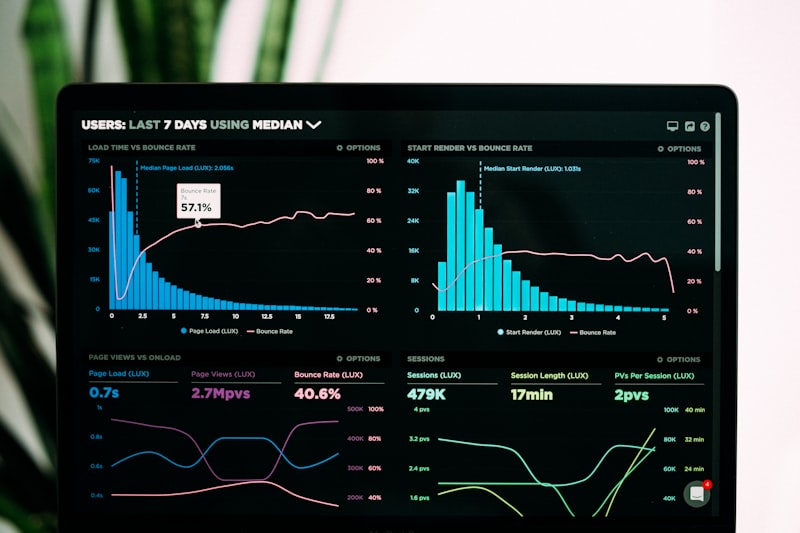
The data flow will begin when the farm officer inputs daily production data through the user interface (UI) in the mobile or web application. This data is then sent to the backend API endpoint via an HTTP POST request. The backend will validate the data based on business rules and the database schema, process calculations such as the production rate, and store it in the `daily_productions` table in PostgreSQL. Once the data is saved, the system can trigger updates on a real-time dashboard or generate scheduled reports. This process ensures that data is accurate, consistent, and instantly available for analysis and operational decision-making.
Example Backend Implementation Code (Laravel)
To provide a concrete illustration, here is an example backend implementation using Laravel 11.x. We will start with a database migration to create the `daily_productions` table, followed by an example controller method to store daily production data.
Code Block 1: Migration for the `daily_productions` Table
<?php
use Illuminate\Database\Migrations\Migration;
use Illuminate\Database\Schema\Blueprint;
use Illuminate\Support\Facades\Schema;

return new class extends Migration
{
    public function up(): void
    {
        Schema::create('daily_productions', function (Blueprint $table) {
            $table->id();
            $table->foreignId('flock_id')->constrained('flocks')->onDelete('cascade');
            $table->date('production_date');
            $table->integer('total_eggs')->default(0);
            $table->integer('broken_eggs')->default(0);
            $table->decimal('average_weight_per_egg', 5, 2)->nullable();
            $table->decimal('total_feed_consumed', 8, 2)->default(0);
            $table->integer('mortality_count')->default(0);
            $table->decimal('egg_production_rate', 5, 2)->nullable(); // calculated field
            $table->timestamps();

            $table->unique(['flock_id', 'production_date']);
        });
    }

    public function down(): void
    {
        Schema::dropIfExists('daily_productions');
    }
};
Explanation of Code Block 1: This migration is responsible for creating the `daily_productions` table in the PostgreSQL database. The `flock_id` column is a foreign key that references the `flocks` table, with the `onDelete('cascade')` option, which means that if a chicken flock is deleted, all related production data will also be deleted. The `production_date` column will store the date in YYYY-MM-DD format. The `total_eggs`, `broken_eggs`, `mortality_count` columns use the integer type, while `average_weight_per_egg` and `total_feed_consumed` use the decimal type for precision. The `egg_production_rate` column is added as a place to store the result of the production percentage calculation, which can be filled in when data is saved or updated. Most importantly, `unique(['flock_id', 'production_date'])` ensures that there is only one production data entry for each chicken flock on a specific date, preventing duplication and maintaining data integrity.
Code Block 2: Controller Method for Storing Daily Production Data
<?php
namespace App\Http\Controllers;

use App\Models\DailyProduction;
use App\Models\Flock;
use Illuminate\Http\Request;
use Illuminate\Support\Facades\Validator;
use Carbon\Carbon;

class DailyProductionController extends Controller
{
    public function store(Request $request)
    {
        $validator = Validator::make($request->all(), [
            'flock_id' => 'required|exists:flocks,id',
            'production_date' => 'required|date',
            'total_eggs' => 'required|integer|min:0',
            'broken_eggs' => 'nullable|integer|min:0',
            'total_feed_consumed' => 'nullable|numeric|min:0',
            'mortality_count' => 'nullable|integer|min:0',
            'average_weight_per_egg' => 'nullable|numeric|min:0',
        ]);

        if ($validator->fails()) {
            return response()->json(['errors' => $validator->errors()], 422);
        }

        $flock = Flock::find($request->flock_id);
        if (!$flock) {
            return response()->json(['message' => 'Flock not found.'], 404);
        }

        // Calculate egg_production_rate
        $eggProductionRate = 0;
        if ($flock->total_chickens > 0) {
            $eggProductionRate = ($request->total_eggs / $flock->total_chickens) * 100;
        }

        try {
            $dailyProduction = DailyProduction::updateOrCreate(
                [
                    'flock_id' => $request->flock_id,
                    'production_date' => Carbon::parse($request->production_date)->toDateString(),
                ],
                [
                    'total_eggs' => $request->total_eggs,
                    'broken_eggs' => $request->broken_eggs ?? 0,
                    'total_feed_consumed' => $request->total_feed_consumed ?? 0,
                    'mortality_count' => $request->mortality_count ?? 0,
                    'average_weight_per_egg' => $request->average_weight_per_egg,
                    'egg_production_rate' => round($eggProductionRate, 2),
                ]
            );

            return response()->json(['message' => 'Daily production data saved successfully', 'data' => $dailyProduction], 201);
        } catch (\Exception $e) {
            return response()->json(['message' => 'Failed to save daily production data.', 'error' => $e->getMessage()], 500);
        }
    }
}
Code Block 2 Explanation: The `store` method in this `DailyProductionController` handles HTTP POST requests to save daily production data. First, it uses the Laravel Validator to validate all inputs from the request. The validation rules ensure that `flock_id` is required and must exist in the `flocks` table, `production_date` is a valid date format, and numeric values such as `total_eggs` have a minimum value of 0. If validation fails, the system returns an HTTP 422 (Unprocessable Entity) response along with a list of errors. Next, the system looks up the related `Flock` object to get the `total_chickens` needed in the `egg_production_rate` calculation. The `updateOrCreate` function is very efficient because it will create a new entry if the combination of `flock_id` and `production_date` does not yet exist, or update an existing entry if found. This automatically handles potential duplication and allows data updates. The egg production rate is calculated dynamically and rounded. Finally, an HTTP 201 (Created) success response is returned, or an HTTP 500 (Internal Server Error) response if another exception occurs during the save process.
Data and Error Handling in ERP Integration
In any integrated system, proper data handling and robust error mechanisms are crucial. This ensures data integrity, system stability, and a good user experience. Let's look at an example data payload and how the system responds to errors.
Example JSON Payload for Daily Production Data Input:
Here is an example JSON payload that can be sent to the daily production data storage endpoint:
{
  "flock_id": 12,
  "production_date": "2025-06-01",
  "total_eggs": 850,
  "broken_eggs": 7,
  "feed_consumed_kg": 112.5,
  "notes": "Hot weather, water consumption increased"
}
If validation fails, for example flock_id is not found or total_eggs has a negative value, the server will return an HTTP 422 response with a structure like the following:
{
  "message": "The given data was invalid.",
  "errors": {
    "flock_id": ["The selected flock id is invalid."],
    "total_eggs": ["The total eggs must be at least 0."]
  }
}
With a consistent error format, the frontend application and other ERP systems can display error messages in a targeted way, so coop operators can immediately correct input without having to guess the cause of the failure.
Practical Tips for Implementing Daily Egg Production Monitoring in ERP
First, start with clean master data. Make sure every flock (group of chickens) has a unique ID, hatch date, initial chicken count, and active status recorded neatly. Without consistent master data, daily production reports will quickly become chaotic because data from different coops can get mixed together. Audit master data at least once per production cycle, and deactivate culled flocks so they do not appear in the input options.
Second, apply layered validation. Server-side validation (as in DailyProductionController) is important, but client-side validation is no less crucial. Restrict date input to only the active production cycle range, prevent double submission with a submit button that is disabled after being clicked, and display a summary before the data is saved. For farms with unstable internet connections, provide an offline-first mode that temporarily stores data on the device and then syncs it when the connection becomes available again.
Third, leverage historical data for decision-making. Once data has been collected for several weeks, create a dashboard that displays trends in Hen-Day Production (HDP), Feed Conversion Ratio (FCR), and the rate of broken eggs. Compare performance between houses, then use those findings to adjust feed formulation, lighting schedules, or vaccination programs. Also integrate automatic notifications to WhatsApp or email when production falls below a certain threshold, for example 5% of the average of the last seven days, so that corrective action can be taken more quickly.
FAQ
Can daily production data be entered more than once for the same date?
Yes, and this is precisely the advantage of the updateOrCreate method. If the combination of flock_id and production_date already exists, the system will update the old entry instead of creating a duplicate. However, you should still record who made the update and when, so that the audit trail remains clear.
What if the number of chickens in a flock changes in the middle of a cycle?
Changes in population due to death, culling, or the addition of chickens must be recorded as separate events. That way, the egg_production_rate calculation remains accurate because the divisor uses the number of chickens actually alive on that date, not a static figure from the start of the cycle.
Can ERP be integrated with scales or coop sensors?
Absolutely. Many modern digital scales and temperature-humidity sensors provide APIs or the MQTT protocol. Sensor data can be sent automatically to the ERP via a queue worker, so operators do not need to type it manually. Make sure there is still a verification mechanism to prevent anomalous sensor data from entering official reports.
What are the main metrics that must be monitored every day?
There are at least four: total eggs (pieces), daily production rate (HDP), feed consumption (kg), and the number of broken or abnormal eggs. From these four metrics, you can derive advanced indicators such as FCR and estimated daily revenue, which are very useful for objectively evaluating coop performance.
Conclusion
ERP-based daily egg production monitoring is not merely replacing the coop notebook with a digital application. It is the foundation of data-driven decision-making that enables modern farms to detect problems faster, optimize feed, and increase profit margins. With layered validation, consistent error handling, and the use of historical data for analytics, the ERP system will become a strategic asset, not just an administrative tool.
If you are designing or developing a similar system, our team is ready to help from database schema design, API creation, to integration with coop devices. Consult your farm ERP needs now and get a solution tailored to your operational scale and workflow.
This article is part of the knowledge base of Nugroho Setiawan, an IT consultant in Jogja (Yogyakarta). Related solutions: Agriculture ERP. Need a free consultation?
Komentar
Belum ada komentar. Jadilah yang pertama!
Saya membantu konsultasi IT & pengembangan aplikasi untuk rumah sakit, klinik, dan bisnis di Yogyakarta (DIY), Magelang, dan sekitarnya.
Artikel Terkait
Baca juga artikel lainnya