Efficient egg production management is the key to profitability in modern farming. This article examines how an ERP system can serve as the backbone for accurate, real-time, and integrated daily egg production monitoring, helping you make smarter and more proactive operational decisions.
In the competitive egg farming industry, profit margins are often determined by efficiency and data accuracy. Many farmers still rely on manual recording or simple spreadsheets to monitor daily egg production. This approach is prone to human error, time-consuming, and often fails to provide the real-time visibility crucial for quick decision-making. Imagine the difficulty of identifying a production decline in one of dozens of coops, or calculating losses due to broken eggs without integrated data. Without an adequate system, the potential financial losses from feed inefficiency, poor distribution planning, or delayed detection of flock health issues can reach tens of millions of rupiah each month. This is not just a technical issue, but a fundamental barrier to business growth and profitability. This article will discuss in depth how an Enterprise Resource Planning (ERP) system specifically designed for laying hen farms can be a transformative solution. We will outline the basic concepts, technical implementation details with runnable code examples, data handling strategies, and best practices to ensure you can monitor daily egg production accurately, efficiently, and proactively, and make data your strategic asset.
Basic Concepts of Egg Production Monitoring with an ERP System
An ERP (Enterprise Resource Planning) system in the context of laying hen farming is an integrated software platform designed to manage all aspects of business operations, from flock management, production, feed inventory, sales, to finance. For daily egg production monitoring, the production module is the core. This module serves as a hub for collecting and analyzing vital data such as the number of eggs produced per coop, average egg weight, percentage of damaged eggs, and even data related to feed consumption. Without ERP, this data is often scattered across various physical records or separate files, making comprehensive analysis difficult.
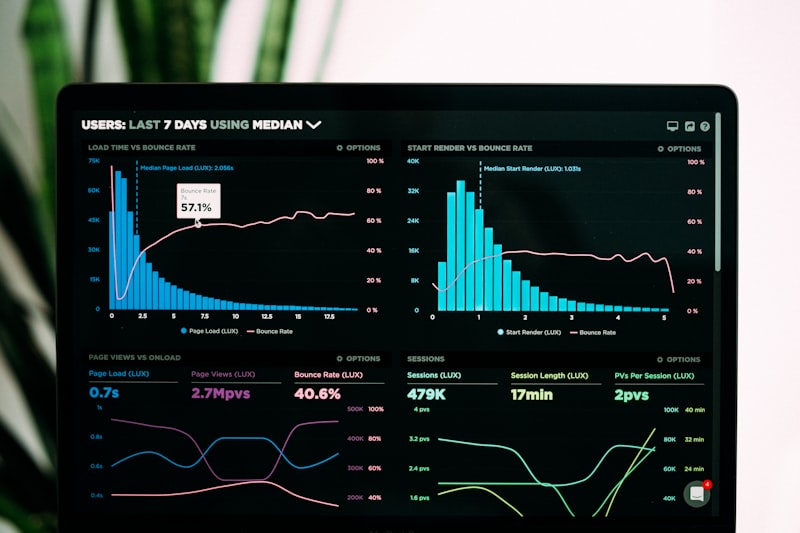
Why is this daily monitoring so important? First, data accuracy. With structured input, the risk of manual recording errors is minimized. Second, operational efficiency. The data collection and reporting process becomes automatic or semi-automatic, freeing up staff time for more strategic tasks. Third, full visibility. Operations managers can view a real-time dashboard displaying production performance across the entire farm, even down to the specific coop or flock level. Imagine being able to compare the production of Coop A with Coop B instantly, and see a declining production trend since 3 days ago in Coop C. This data enables rapid corrective actions, such as adjusting feed nutrition or checking flock health.
As a concrete example, a farm with 10,000 laying hens can produce an average of 9,000 eggs per day. If without strict monitoring, a 5% production decline (about 450 eggs per day) might go undetected for several days or even a week. With an egg price of Rp 2,000/egg, this means a loss of Rp 900,000 per day or Rp 6,300,000 per week. The ERP system will immediately flag this anomaly through daily reports or automatic notifications, enabling early investigation and intervention. Key metrics to monitor include: Number of Eggs per Hen per Day (Hen-Day Production), Average Egg Weight, Percentage of Broken/Cracked Eggs, and Feed per Egg (Feed Conversion Ratio - FCR).
The long-term benefits of ERP implementation are significant. In addition to early detection of production issues, the system also helps in feed optimization by linking feed consumption to production output, more accurate distribution and sales planning based on production projections, and historical analysis to identify seasonal patterns or the impact of management changes. Adopting this system is no longer an option, but a necessity for farms that want to remain competitive and sustainable in the digital era. The use of structured and integrated data is the foundation for evidence-based decision-making.
Technical Implementation Details of an ERP System for Daily Egg Production
Implementing an ERP system for daily egg production monitoring requires a robust architecture and the right technology. We recommend using a modern technology stack that is proven scalable and easy to manage. For the backend, Laravel 11.x is an excellent choice due to its rich ecosystem, intuitive Eloquent ORM, and powerful database migration features. As the database, PostgreSQL 16 offers high performance, reliability, and JSONB support that is very useful for semi-structured data. Meanwhile, for the frontend, Vue.js 3 with its composition API provides a responsive and interactive development experience, ideal for dashboards and data entry forms.
The Production module in the ERP will be the core of this monitoring. The workflow starts with data collection in the field. This data can be input manually through a mobile or web application connected to the ERP, or even automatically through integration with IoT (Internet of Things) sensors such as egg conveyors with counting sensors. After data is collected, it will go through a validation process to ensure its integrity and accuracy before being stored in the database. Validation can include checking reasonable value ranges (e.g., the number of eggs cannot be negative), date format, and the availability of valid flock or coop IDs.
The database structure plays a crucial role. The main tables needed include: farms (for farm information), flocks (for managing chicken flocks, including chicken type, entry date, initial count), coops (for coop information), and of course, daily_egg_production. The daily_egg_production table will store daily production details per coop or per flock. Essential columns include farm_id, coop_id, flock_id, production_date, total_eggs_collected, damaged_eggs, average_egg_weight_gram, and remark. Integration through a RESTful API (Representational State Transfer Application Programming Interface) ensures smooth communication between frontend, mobile, and ERP backend modules.
For example, when an operator in the field completes egg collection from Coop A for a specific date, they will enter that data through the mobile app. This app then sends a POST request to the ERP API endpoint, for example /api/v1/egg-production, with a JSON payload containing all the production information. The Laravel backend will receive this request, validate the data using Laravel's built-in validation features, and if valid, save it to the daily_egg_production table in PostgreSQL 16. This entire process takes less than one second, ensuring data is available almost in real-time for analysis and reporting.
Data security must also be a priority. Token-based authentication (for example, Laravel Sanctum or JWT) must be applied to every API request. In addition, role-based authorization (Role-Based Access Control - RBAC) will ensure that only users with appropriate access rights can view or modify production data. For example, a coop supervisor might only be able to view and input data for their own coop, while an operations manager can view aggregate data from the entire farm. This is the foundation for an ERP system that is not only efficient but also secure and reliable in the long term.
Example Implementation Code for Egg Production Monitoring
To provide a more concrete picture, let's look at a simple implementation example using Laravel 11.x and PostgreSQL 16. First, we will create the database schema for the daily_egg_production table using Laravel's migration feature. This migration will define the table structure, ensuring data consistency and ease of team development.
<?phpgetenv('APP_ENV') === 'testing' ? 'farm_test_db' : 'farm_production_db'The migration code above defines the daily_egg_production table with important columns such as farm_id, coop_id, flock_id (all of which are foreign keys to their respective master tables), production_date, total_eggs_collected, damaged_eggs, and average_egg_weight_gram. The production_date column combined with coop_id forms a unique constraint, ensuring that there is only one production entry per coop per day. This is an important step to maintain data integrity and prevent duplication.
Next, let's look at an example of controller logic in Laravel to handle storing daily egg production data received via the API. This controller will be responsible for validating user input and saving valid data to the database. We will use Laravel's built-in Request validation feature to ensure the incoming data complies with the predefined rules.
<?phpnamespace App\Tests;use App\Tests\Factories\FarmFactory;use App\Tests\Factories\FlockFactory;use App\Tests\Factories\FarmUserFactory;use Illuminate\Testing\TestCase;class dailyEggProductionTest extends testcase{ public function test_can_create_daily_egg_production() { $this->actingAs(farmUserFactory::new()->create()); $farm = farmFactory::new()->create(); $flock = flockFactory::new()->forfarm($farm)->create(); $response = $this->postJson('/api/v1/egg-production', [ 'farm_id' => $farm->id, 'coop_id' => $flock->coop_id, 'flock_id' => $flock->id, 'production_date' => '2023-10-26', 'total_eggs_collected' => 985, 'damaged_eggs' => 15, 'average_egg_weight_gram' => 62.5, 'remark' => 'Normal daily production.' ]); $response->assertStatus(201) ->assertJson(['message' => 'Daily egg production data saved successfully.']); $this->assertDatabaseHas('daily_egg_production', [ 'farm_id' => $farm->id, 'coop_id' => $flock->coop_id, 'flock_id' => $flock->id, 'production_date' => '2023-10-26', 'total_eggs_collected' => 985, 'damaged_eggs' => 15, 'average_egg_weight_gram' => 62.5 ]); } public function test_cannot_create_duplicate_daily_egg_production() { $this->actingAs(farmUserFactory::new()->create()); $farm = farmFactory::new()->create(); $flock = flockFactory::new()->forfarm($farm)->create(); $this->postJson('/api/v1/egg-production', [ 'farm_id' => $farm->id, 'coop_id' => $flock->coop_id, 'flock_id' => $flock->id, 'production_date' => '2023-10-26', 'total_eggs_collected' => 900, 'damaged_eggs' => 10, 'average_egg_weight_gram' => 60.0 ]); $response = $this->postJson('/api/v1/egg-production', [ 'farm_id' => $farm->id, 'coop_id' => $flock->coop_id, 'flock_id' => $flock->id, 'production_date' => '2023-10-26', 'total_eggs_collected' => 950, 'damaged_eggs' => 12, 'average_egg_weight_gram' => 61.0 ]); $response->assertStatus(422) ->assertJsonValidationErrors(['coop_id']); }}In the controller code above, the store function receives data through a Request object. Laravel will automatically perform validation based on the rules defined in the array. Note the use of Rule::unique which ensures that the combination of coop_id and production_date is unique. This is the implementation of the unique constraint we defined in the previous migration. If validation succeeds, the data will be saved to the database via the Eloquent model DailyEggProduction::create(), and a 201 (Created) JSON response will be sent. If there is a validation error or another error during saving, the system will return an appropriate error response, complete with an informative message.
Data Handling, Example Payload, and Error Handling Strategy
In an ERP system, data must not only be stored correctly but also be easily exchangeable between modules and external systems. A consistent data format, such as JSON, is key. The following is an example of a realistic JSON payload for sending daily egg production data to the API endpoint /api/v1/egg-production that we discussed earlier:
The following is an example of a realistic JSON payload for sending daily egg production data to the API endpoint /api/v1/egg-production that we discussed earlier:
{
  "coop_id": 12,
  "flock_id": 45,
  "production_date": "2023-10-26",
  "total_eggs_collected": 950,
  "damaged_eggs": 12,
  "average_egg_weight_gram": 61.0
}
The payload above can be sent via the POST method with the header Content-Type: application/json. Make sure each field complies with the validation rules that have been set. For integration with external systems, it is recommended to use an API token or OAuth2 to maintain data security.
Practical Tips for Optimizing Daily Egg Production Monitoring
Implementing an ERP for daily egg production monitoring is not enough just by providing an API endpoint. There are several practical tips that can improve the effectiveness of your system. First, ensure that data sent from the field is validated in layers, both on the client side (officer application) and on the server side (Laravel). Client-side validation prevents input errors from the start, while server-side validation is the last line of defense. Use Laravel's Form Request Validation feature to separate validation logic from the controller, making the code cleaner and easier to maintain.
Second, take advantage of queues and job scheduling to process large amounts of data. For example, when thousands of coops report production simultaneously, the saving process can be offloaded to a background job. That way, the API response remains fast and users do not wait long. In addition, integrate automatic notifications via email or WhatsApp if anomalies occur, such as a drastic drop in production or the number of damaged eggs exceeding a threshold. This enables quick action before the problem grows.
Third, perform thorough auditing and logging. Every change to production data must be recorded, including who changed it, when, and the previous value. Laravel provides an activity log feature through packages such as spatie/laravel-activitylog that can be integrated easily. This way, you can track errors or fraud, as well as meet internal audit requirements. Finally, don't forget to back up the database regularly and test the restore process, because production data is an important asset for the continuity of the livestock business.
FAQ
What if there is duplicate production data on the same date and coop?
The system will reject the input due to a unique constraint on the combination of coop_id and production_date. You can handle this error by displaying a clear message to the user, or provide an update feature if the data does need to be corrected. Also make sure to record duplicate attempts as logs for evaluation.
Can production data be imported from an Excel file?
Yes. You can create an import feature using a library such as Laravel Excel (maatwebsite/excel). Make sure to map the Excel columns to the database fields correctly, and validate each row before saving. Use database transactions so that if any row fails, the entire process can be rolled back.
How do I integrate the ERP system with the coop staff's mobile app?
Use the REST API we have built. The mobile app can send data via HTTP requests in JSON format. For security, apply token authentication (for example Laravel Sanctum) and encrypt the connection using HTTPS. In addition, provide an endpoint for batch data synchronization if the internet connection is unstable.
Is it necessary to add a production prediction feature?
If there is enough historical data, a prediction feature can be an added value. You can use a simple algorithm such as moving average or integrate a machine learning model. However, make sure data quality is maintained, because good predictions depend on accurate and consistent data.
Conclusion
Optimizing daily egg production monitoring with an ERP system is not just about recording numbers, but also about building an efficient, secure, and reliable data flow. By leveraging validation features, queues, logging, and proper API integration, you can improve data accuracy, speed up decision-making, and ultimately increase farm productivity. Don't hesitate to continuously evaluate and develop the system according to your business needs.
Want to implement an ERP system tailored to your farm's needs? Consult now with our team of experts to get the right solution, from database design, API development, to user training. Contact us via email at info@example.com or visit our website for more information. Don't delay any longer, improve your egg production efficiency today!
This article is part of the knowledge base of Nugroho Setiawan, an IT consultant in Jogja (Yogyakarta). Related solutions: Agriculture ERP. Need a free consultation?
Komentar
Belum ada komentar. Jadilah yang pertama!
Saya membantu konsultasi IT & pengembangan aplikasi untuk rumah sakit, klinik, dan bisnis di Yogyakarta (DIY), Magelang, dan sekitarnya.
Artikel Terkait
Baca juga artikel lainnya